
🤔 Problem
Users see this error message ”Please activate your account through Invitation Email”:
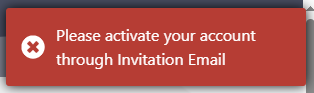
The error message typically appears immediately after setting a password and attempting to login with your new credentials
🌱 Solution
This occurs when the system has been too slow to lock in the password you just created, so it is lost. To resolve:
-
Return to your PRISM Invite email & complete the steps to Activate your PRISM account for the first time.
-
Click the link (again) to activate your PRISM Account
-
You should be asked to set a password (can be the old password or a new one)
-
You should now be on the login page - enter your email and password
-
You should now be on the PRISM Home screen, ready to start Tests.
If the above steps do not resolve, create a SafeSelect Support ticket for further assistance.