
Occasionally, updates or changes may affect your connection, stopping you from accessing your PRISM account to complete assessments.
If this happens, the first step is to try opening the website with a Private or Incognito Window.
If this is unsuccessful, you may need to clear your cache as noted here:
Help! My screen is not working, how to clear your cache
Why are Private or Incognito windows useful?
For most users, you will access your PRISM account (or any website) without issue as the web address or settings has not changed from https://prism.convergeintl.com.au/.
However, if you find you are unable to access, or slow to load a page, then is most likely that your browser has cached all the old settings and needs to ignore the old settings to display the page.
When you use Private or Incognito mode, any text, images, or cookies required by the websites you visit are retrieved and stored temporarily and deleted when you close the incognito window.
So the browser is not relying on stored data to access the website.
How to open a Private or Incognito Window
Google Chrome (Desktop)
-
Open Google Chrome.
-
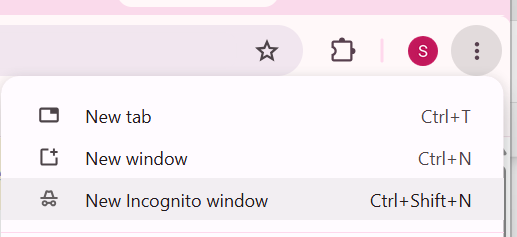
Click the three-dot menu (⋮) in the top-right corner.
-
Select New Incognito window
-
Copy and paste the web address (URL) into the new browser window - https://prism.convergeintl.com.au/
-
Access your PRISM account as normal
Microsoft Edge (Desktop)
-
Open Microsoft Edge.
-
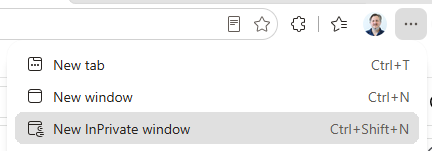
Click the three-dot menu (•••) in the top-right corner.
-
Select New InPrivate window
-
Copy and paste the web address (URL) into the new browser window - https://prism.convergeintl.com.au/
-
Access your PRISM account as normal
Safari (Mac)
-
Open Safari.
-
Click the File icon
-
Select New Private window
-
Copy and paste the web address (URL) into the new browser window - https://prism.convergeintl.com.au/
-
Access your PRISM account as normal
Safari (iPhone/iPad)
-
Open Safari
-
Click the three-dot menu (•••) in the bottom-right corner
-
Select New Private tab
-
Copy and paste the web address (URL) into the new browser window - https://prism.convergeintl.com.au/
-
Access your PRISM account as normal
Mozilla Firefox (Desktop)
-
Open Firefox.
-
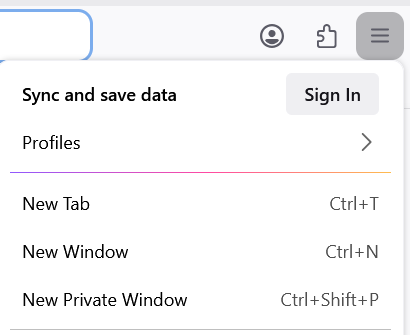
Click the menu icon (☰) in the top-right corner
-
Select New Private window
-
Copy and paste the web address (URL) into the new browser window - https://prism.convergeintl.com.au/
-
Access your PRISM account as normal
Need support?
If you need any further assistance, please raise a ticket with the User Support team here: https://convergeintl.atlassian.net/servicedesk/customer/portal/18